How to Check If a Link Is Safe Before Clicking
A suspicious link rarely arrives with a warning. It may appear in a delivery update, a bank alert, a shared document, a customer-service reply, or a message from someone whose account has been compromised. The text can look familiar, the logo can be convincing, and the page may even use the correct colors and language. None of those details proves that the destination is safe.
The risk becomes harder to judge when a link contains several languages or regional signals. A button may be written in Korean, the domain may belong to Bahrain, and the path may contain a Hungarian language code. That combination is not automatically malicious. International services often support many languages and operate through regional entities. However, it does mean the reader must inspect the address rather than trust the label.
The safest habit is simple: pause before opening an unexpected link, reveal its real destination, identify the registered domain, and verify the address through an independent route. A security scanner can support that decision, but it cannot replace basic judgment. New phishing pages and recently compromised websites may not have been classified yet.
The following process works for links in email, text messages, social media, QR codes, advertisements, and online articles. It does not require advanced technical knowledge. It requires a few deliberate checks in the correct order.
Preview the Real Destination Without Opening It
Visible link text and the address behind it are separate pieces of information. A button can say “View invoice” while pointing to an unrelated domain. A link can display the name of a well-known company while sending the visitor somewhere else. Always inspect the destination before treating the label as meaningful.
On a desktop computer, place the pointer over the link without clicking. Most browsers and email applications display the destination near the bottom of the window. Read the entire address if space allows. If the preview is shortened, copy the link without opening it and paste it into a plain-text note. Do not paste a suspicious address into the browser bar and press Enter by habit.
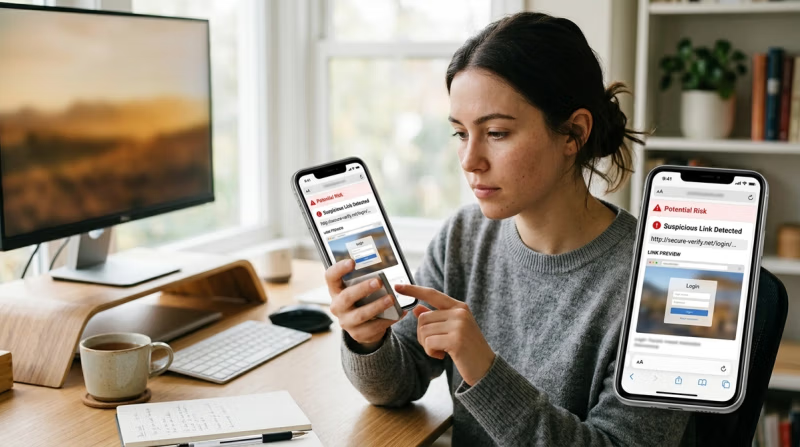
On a phone or tablet, press and hold the link. The device will usually show a preview menu containing the destination and options such as copy, open, or share. Choose copy only if you need to inspect the text elsewhere. Be careful with touch screens, since a quick tap can open the page instead of displaying the menu.
QR codes require the same caution. A poster, restaurant table, parking meter, package, or event badge can carry a sticker placed over the original code. Use a camera app that shows the decoded address before opening it. If the phone offers only an immediate launch, use a QR scanner with a preview function or avoid the code and find the service independently.
Shortened links hide the final destination. Addresses created through URL-shortening services can be legitimate, but they remove the information needed for an initial domain check. Use a reputable link-expansion or preview service that reveals redirects without requiring an account, download, browser extension, or payment. If the preview tool asks for credentials or tries to install software, stop and choose another method.
A copied address should be examined as plain text. Look for unexpected spaces, encoded characters, long tracking parameters, and a domain that appears late in the string. Attackers sometimes place a trusted brand in a subdomain or path, hoping the reader will stop after seeing the familiar name. In trusted-brand.example-scam.com, the registered domain is usually example-scam.com, not trusted-brand.
The message around the link also matters. Unexpected urgency, a threat of account closure, a prize, a refund, or a demand to verify immediately creates pressure to skip inspection. A legitimate issue may still be urgent, but the safe response is to open the company’s known app or type its official address independently. There is no need to use the link supplied in the message.
Do not rely on the sender name alone. Email display names can be imitated, telephone numbers can be spoofed, and a real social account can be taken over. Ask whether the request is normal for that sender and whether the destination fits the stated purpose. A colleague who usually shares documents through the company platform should not suddenly send an unfamiliar login page from a personal account.
The first decision is not whether the page looks convincing. It is whether the destination deserves to be opened at all. If the preview does not match the expected service, stop there.
See also: where to find businesses for sale
Read the Hostname Before the Path or Button Text
A web address contains several parts, but the hostname deserves attention first. It appears after https:// and before the next slash. Within the hostname, the registered domain is the portion controlled by the site owner. Everything after the first slash is a path, and it can contain almost any word chosen by that owner.
Consider a link labeled 바이낸스 가입, meaning “Binance sign up” in Korean. The visible label is Korean, while the hostname ends in .bh, the country-code domain for Bahrain. The path begins with /hu/, which is commonly used as a Hungarian locale marker. These elements describe different aspects of the link. They do not prove that the page is intended for Korean residents, Hungarian residents, or every visitor who can open it.
This example shows why translation cannot replace URL inspection. A familiar Korean phrase may correctly describe the button, but it says nothing by itself about the company behind the hostname. Likewise, a Hungarian language path changes presentation, not necessarily the legal entity, account country, or eligibility rules. The domain and the current onboarding terms carry more weight than the language visible on the screen.
Read hostnames from right to left when identifying their structure. In accounts.example.com, example.com is the registered domain and accounts is a subdomain. In example.com.security-check.net, the registered domain is security-check.net; the word example is only part of a subdomain. This pattern is common in deceptive links because many readers focus on the first familiar word.
Watch for misspellings and substitutions. A fake address may remove one letter, add a hyphen, switch two characters, or replace a letter with a similar-looking symbol from another writing system. The difference can be difficult to see in a small mobile preview. Copy the hostname into a note, enlarge the text, and compare it with an independently obtained official address.
Punycode deserves attention when international characters are involved. Browsers may convert some non-Latin domain names into a form beginning with xn--. Internationalized domains are legitimate and widely used, so the prefix is not proof of fraud. It is a signal to verify the exact domain carefully, especially when characters from different scripts resemble one another.
The presence of https:// and a padlock is also limited evidence. Encryption protects the connection between the browser and the site named in the address. It does not prove that the site belongs to the brand it imitates. A phishing operator can obtain a valid certificate for a deceptive domain.
Ports, paths, and query parameters come after the hostname. A strange path may be worth investigating, but a normal-looking path cannot rescue the wrong domain. Referral codes and campaign parameters are common in legitimate marketing links, yet they do not establish safety either. Verify the destination first, then decide whether the remaining parameters are expected.
Regional domains require an additional question: does this version of the service apply to the user’s actual country and circumstances? A page can be genuine while still being the wrong route for a particular visitor. Before entering identity details or financial information, confirm the serving legal entity, supported residence, age requirements, and account conditions shown during registration. Never enter a false address or choose a different region simply because the form continues.
Verify the Domain Through an Independent Route
Once the hostname looks plausible, verify it without relying on the original message. Open a new browser tab and type the company name or a previously saved official address. A bookmarked page created during an earlier verified visit is better than a search advertisement. If using search, distinguish the normal result from sponsored placements and compare the destination before opening it.
Navigate from the official homepage to the relevant service. If the message claims that an account needs attention, open the known mobile app or sign in through the independently located site. A genuine warning should usually be visible in the account notification area. If no notice appears, contact support through the channel listed on the official site rather than replying to the original sender.
Compare the domain character by character. Check the spelling, top-level domain, subdomain, and regional suffix. Some global brands use several legitimate domains, so a difference does not automatically mean fraud. The company’s official site, help center, terms, or domain-verification tool may list regional addresses. The important point is to find confirmation through a route that did not originate with the suspicious message.
For a financial or account-registration page, identify the company named in the footer and terms. A brand may operate through separate legal entities in different countries. Confirm that the entity, domain, and user’s residence make sense together. A regional site may be authentic but unavailable to residents elsewhere.
A URL reputation checker can provide another signal. Services such as Google Safe Browsing and established security vendors compare addresses with known threat data. Copy the URL into the checker without opening the destination. A warning is a strong reason not to proceed.
A clean result is not a certificate of safety. Reputation systems need time and evidence to classify new pages. A phishing site created that morning may have no record. A legitimate website can also be compromised temporarily. Treat the scan as one part of the decision, together with the domain, source, context, and requested action.
Consider what the page wants. A link that immediately asks for a password, payment card, identity document, wallet recovery phrase, one-time code, software installation, browser permission, or remote access deserves extra scrutiny. No support agent needs a recovery phrase or password to investigate an account. One-time authentication codes should be entered only into the verified service for the action the user initiated.
Look for consistency across official channels. Does the company publish the same announcement in its app, help center, or verified social account? Does the support page mention the same procedure? A promotion visible only through a direct message is weaker evidence than a clearly documented offer on the official site.
If doubts remain, do not open the link. Contact the organization using a telephone number, email address, or support form obtained independently. For a message apparently sent by an employer, bank, courier, or government office, use a known internal directory or official public website. A short verification call is less costly than recovering a compromised account.
Limit the Damage If You Already Opened the Link
Opening a suspicious page does not always mean an account has been compromised. The response depends on what happened next. Separate passive viewing from entering credentials, approving permissions, downloading a file, installing software, or sending money.
If the page opened but nothing was entered, downloaded, or approved, close the tab. Do not use buttons on the suspicious page to navigate away or contact support. Open the genuine service independently and check for notifications or recent activity. Update the browser and operating system if they are behind on security fixes.
If a username and password were entered, go to the real service through a trusted route and change the password immediately. Use a new, unique password rather than a variation of the old one. If the same password was used elsewhere, change it on those accounts too, starting with the connected email account. Email access can allow an attacker to reset other passwords.
Review active sessions and sign out devices you do not recognize. Check recent logins, recovery details, trusted devices, API keys, connected applications, payment recipients, and account changes. Enable strong multi-factor authentication through an authenticator app or hardware key where supported. Do not approve an authentication prompt that you did not initiate.
If a one-time code was shared, assume the attacker may have attempted a live login or transaction. Secure the account and connected email, then contact the real provider through its official support channel. State the time of the event and the action that may have been approved so the provider can focus its review.
If identity documents were uploaded, preserve the URL, message, screenshots, and time of submission. Report the incident through the appropriate identity-theft or cybercrime channel in the user’s country and monitor financial accounts for unexpected activity. The exact response depends on the type of document and local process, so use official guidance rather than a recovery service found in a comment or direct message.
A downloaded file should not be opened to “see what it is.” Disconnect it from any automated launch process, scan it with current security software, or delete it according to trusted device guidance. If the file was executed or an application was installed, disconnect the affected device from sensitive accounts and obtain qualified security help. Changing passwords on a device that remains controlled by malware may expose the new credentials as well.
If money or digital assets were sent, contact the relevant bank, card issuer, payment provider, or platform immediately through an official channel. Preserve transaction references and communications. Ignore anyone who guarantees recovery for an advance fee or requests remote access, authentication codes, or additional transfers.
Finally, report the phishing message to the service it impersonated, the email or messaging provider, and the relevant national reporting channel. Reports can help platforms block domains and warn other users, although no report guarantees removal.
A safe-link check is a sequence, not a single tool. Preview the destination, identify the registered domain, verify it independently, and evaluate what the page requests. Languages, logos, padlocks, and clean scanner results can all provide context, but none should override a hostname that does not match the expected service. A pause of less than a minute can prevent days of account recovery.